Current: Enable Automatic DAW Adoption of Custom Macro Names
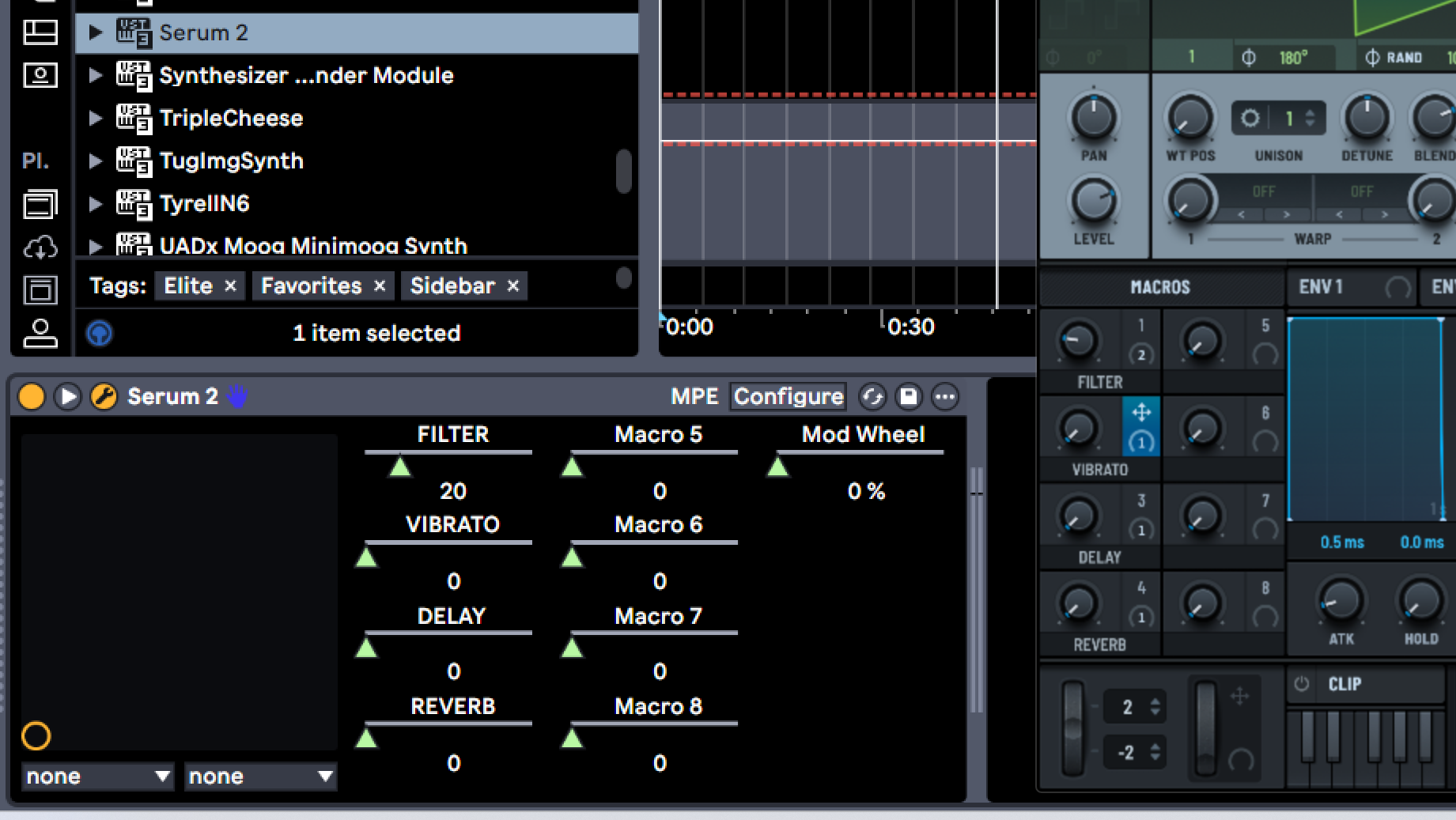
This is a screenshot of Serum 2’s macros, mapped in Ableton.
Notice that the active macros, as they are given names (Filter, Vibrato, Delay, Reverb) in Serum 2, are retitled automatically in Ableton. This is really helpful (as in kind of necessary), so that it is clear what each Macro “is.” Especially when moving from instance to instance of Serum 2 across multiple instrument lanes.
For Current 2.0, the 4 macros should have the same functionality when renaming them. Like Serum 2, as the Macro is given an identifying name in Current, that name change is recognized and applied to the macro automation control in the Ableton tray.
Log in to comment and vote
Comments1
Support Team
Jun 17
Hey there,
Thanks for reaching out!
We really appreciate the thoughtful feedback. I've passed it along to our development team for consideration.
We're interested in adding this in the future, though we don't have a timeline to share at the moment.
We'll keep it in mind as we continue planning and improving the product.
All the best,
Minimal Audio Support